
Dice Table — A Free Dice Roller for Windows
Created by Marcus Draper
Sometimes an idea just won’t let you sleep.
I woke up at 2 AM this morning with an idea that I couldn’t get out of my head: a desktop application that lets you choose your dice, roll them, and see the results right underneath each one.
The more I thought about it, the more I wanted to make it happen. So I got up, got to work, and Dice Table was born. Apparently, my brain decided sleep could wait—there were dice to roll!
I wanted to get this into the hands of people who could enjoy it, so I’m offering it here completely free to download and use.
Seven Dice. Your Choice. Let Them Roll.
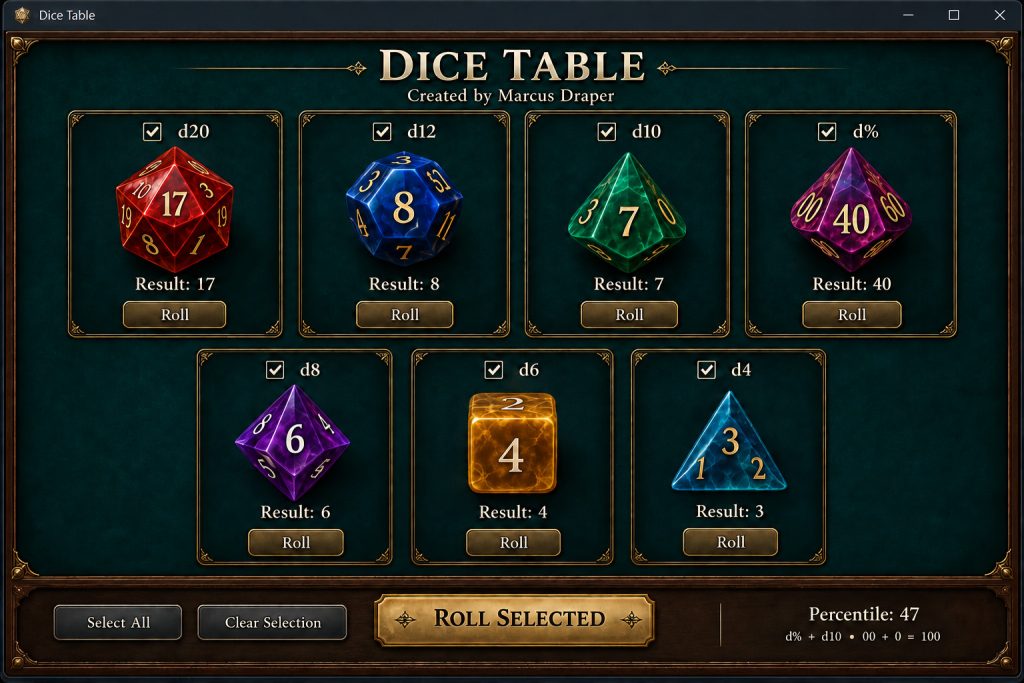
Dice Table brings the standard seven-die tabletop set to your Windows computer:
- d20 — Twenty-sided die.
- d12 — Twelve-sided die.
- d10 — Ten-sided die.
- d% — Percentile die, marked in tens.
- d8 — Eight-sided die.
- d6 — The classic six-sided die.
- d4 — Four-sided die.
Roll a single die using its individual Roll button, or select any combination and click Roll Selected. Each outcome appears directly beneath its die, so you can easily see every result.
Select the d10 and d% together for a combined percentile result from 1 to 100.
Whether you’re playing a tabletop role-playing game, enjoying a solo journaling adventure, or simply need a quick dice roll, Dice Table is ready when you are.
A Little Tabletop Atmosphere
With its deep teal tabletop, gold accents, and colorful dice, Dice Table adds a little atmosphere to your next adventure.
You can also choose how that adventure sounds! There are two free versions available: one with dice-rolling sound effects and one without audio.
Download Dice Table — Choose Your Version
Both versions include all seven dice, individual and group rolling, and results displayed beneath each die.
Hear a short tumble when rolling one die and a fuller clatter when rolling several. This version also includes a Sound On/Off button whenever you want a quiet session.
[Download Dice Table WITH Sound — ZIP]
Prefer to keep things quiet? The original version provides the same dice-rolling features without any audio effects.
[Download Dice Table WITHOUT Sound — ZIP]
Getting Started
- Download the version you prefer.
- Right-click the ZIP file and select Extract All.
- Open the extracted folder.
- Double-click DiceTable.exe and start rolling!
Both versions require Windows with .NET Framework 4.8. Keep the included configuration file beside the application.
No account, subscription, or internet connection is required to use Dice Table.
Help Make It Better
These are the first public releases, and I’d love to hear what you think. If something doesn’t work as expected—or you have an idea that would make Dice Table more useful—please share your feedback through Deskatur.
Thank you for giving my 2 AM idea a place at your gaming table. I hope it brings a little extra fun to your next adventure!
— Marcus Draper
Your dice. Your choice. Let them roll!